1.Find image you want to download from getty images.
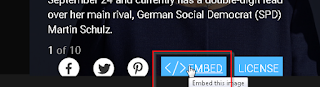
2. At the image click on </embed> button
A new popup window,ll appear with image.
3. Right click on picture and select " Save page as"
save page as Html (name page as you want)
Go to your download folder. You can see there a html (getty-photo,html) page and a folder named getty-photo_files containing all of images you wan to download.
Enjoy !!!
Saturday, September 16, 2017
Thursday, May 11, 2017
Bootstrap Classes List
Bootstrap is very powerful and easy way to create Nice and responsive website. The Tool who is the Base of Bootstrap is (are) Classes.
Classes makes eye catching and responsive web layout. But Its to hard to remember all classes.
There is huge list of classes. Here I,ll provide you all classes list with their description. With description classes are useless. For using bootstrap and its classes you must have some knowledge about HTML and CSS.
Here are some examples:
.alert Creates an alert message box
Alerts
.alert-danger Red alert box. Indicates a dangerous or potentially negative action
Alerts
.alert-dismissable Together with the .close class, this class is used to close the alert
Alerts
.alert-info Light-blue alert box. Indicates some information
Alerts
.alert-link Used on links inside alerts to add matching colored links
Alerts
.alert-success Green alert box. Indicates a successful or positive action
Alerts
.alert-warning Yellow alert box. Indicates caution should be taken with this action
DOWNLOAD Full classes file in RTF (Rich Text Formate) file form Here
Sunday, April 16, 2017
Reduce Header Size Shop Isle wordpress Theme
In the "big title section" shop isle theme set the section height 1780 px. You can reduce this size manually.
Go to Wp-content > Themes > assets > css > style.css
Line No. 2436 >
.home-section {
position: relative;
z-index: 0;
width: 100%;
background-color: #fff;
background-repeat: no-repeat;
background-position: center center;
background-size: cover;
}
insert this code in .home section properties.
max-height:455px; ( or what you need)
Now code look alike :
.home-section {
position: relative;
z-index: 0;
width: 100%;
max-height:455px;
background-color: #fff;
background-repeat: no-repeat;
background-position: center center;
background-size: cover;
}
😀
Tuesday, April 11, 2017
Illustrator did not close Properly error Solution
Go to portable app folder >> Data.
In this folder there is configuration file named "PortableApp.ComLauncherRuntimeData" see the picture below:
Change status running to stopped.
then go to plugin directory: C:\user\Appdata\local\temp\nspFa19.tpm
There is a .ini file named Runtimedata fig.2
open this file with text editor
and change status running to stopped.
Restart your app.
Done
Monday, April 10, 2017
Adobe illustrator CS6 Portable error code 1 (Solution)
Adobe illustrator CS6
Please Uninstall/re-install application
Error Code1
Solution:
Simply go to Portable Illustrator's folder > then
Delete the following folders
1. App
2. Data
3. Other
Then Unpack again Portable Illustrator form his zip file.
Done!
Friday, April 7, 2017
opencart Invalid File Type! Error Solution
In opencart when you want to install an extension or module some time opencart generate an error
Invalid File Type!
Solution
extract all extension files then go to admin >> extension manager>> and select .ocmod file.
Done!!
Friday, February 26, 2016
Thursday, March 13, 2014
Smart Object! a great feature
Open photoshop 800x800 with white color. Pick the pen tool from pen menu and add three anchor points shown a in picture
Now click on path tab in layer panel and the click on the icon load path as selection at the bottom pf panel
create a blank layer and fill with any color and just the direction as you want
Convert it into smart object Layer > smart objects > convert to smart object
Double click on smart object (layer) thumbnail to get the editing mode. here change the layer mode ' Multiply ' and fill a gradient. You can use any colors
Now click save File > save...or CRTL +S and close the smart object editing window
here is the results
Make 9 or 10 copies of this smart object layer by pressing CTRL + J and adjust the all layers in flower shape
make nested circle with circle marquee tool make you have to select ' Subtract from selection '
create a blank layer and fill it with color who nearly mach the center of flower no exact color.Now got to layer style ' Fx ' at the bottom of layer panel fill the patten ( patten overlay) change blend mode normal to color dodge
click Ok and change the layer mode normal to ' Multiply '
Here is Final Result
Working with text in Adobe Photoshop !
Its very easy and handy to working with text in Photoshop. you an trace, re-shape text like other vector graphic software but you can't save your work as vector.
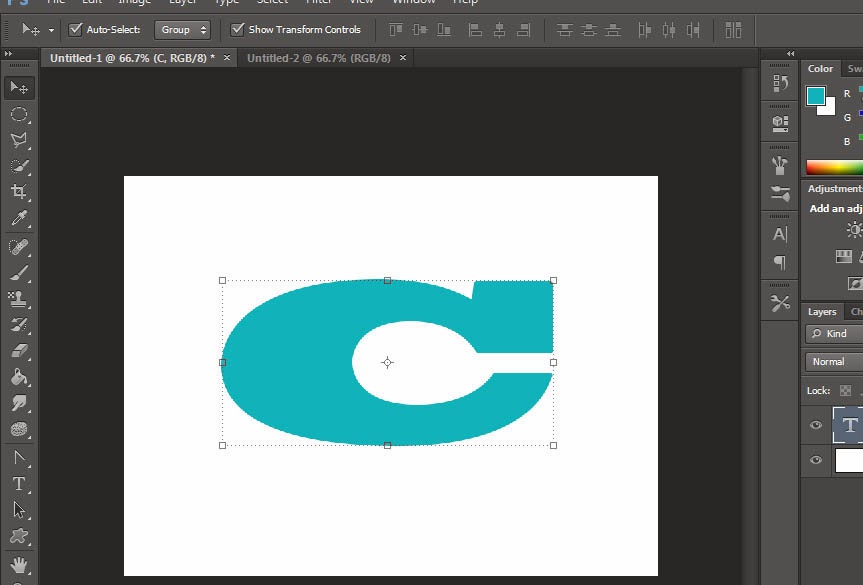
let's start now .... open adobe photoshop and write some thing (single word for practice)
Now CTRL + CLICK on text layer thumbnail
Delete text layer and create a new blank layer
Click on path in layer panel
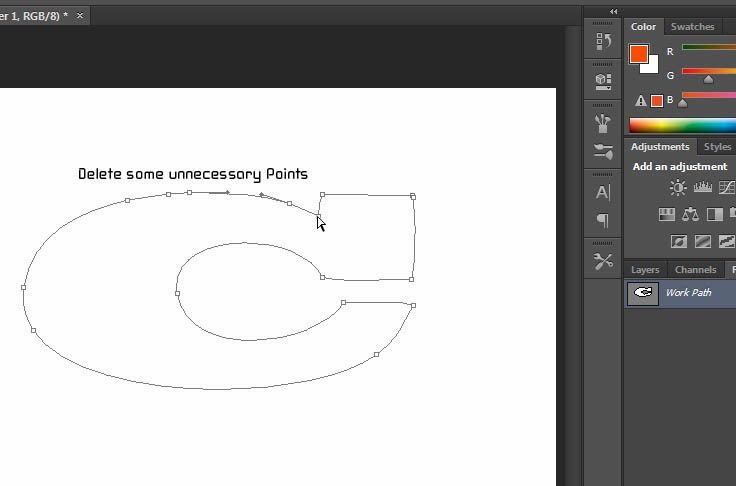
Now Click on make path from selection Icon
Pick delete anchor point tool from pen tool menu and delete some unnecessary points
Now pick the convert point tool from pen tool menu
Re-shape text as u like
in layer panel click on path tab and the click on the make selection from path icon
Fill the selection with desire color final
let's start now .... open adobe photoshop and write some thing (single word for practice)

Delete text layer and create a new blank layer
Click on path in layer panel
Now Click on make path from selection Icon
Pick delete anchor point tool from pen tool menu and delete some unnecessary points
Now pick the convert point tool from pen tool menu
Re-shape text as u like
in layer panel click on path tab and the click on the make selection from path icon
Fill the selection with desire color final
Sunday, March 9, 2014
SMPLAYER !! How to Use...
SMPlayer is a free media player for Windows and Linux with built-in codecs that can also play and download Youtube videos.
One of the most interesting features of SMPlayer: it remembers the settings of all files you play. So you start to watch a movie but you have to leave... don't worry, when you open that movie again it will be resumed at the same point you left it, and with the same settings: audio track, subtitles, volume...
SMPlayer is a graphical user interface (GUI) for the award-winning MPlayer, which is capable of playing almost all known video and audio formats. But apart from providing access for the most common and useful options of MPlayer, SMPlayer adds other interesting features like the possibility to play Youtube videos or download subtitles.
SMPlayer play all types of known media file formats such as .FLV, AVI, .MKV, .MPEG, etc... its also play the blu-ray files.One of the most interesting features of SMPlayer: it remembers the settings of all files you play. So you start to watch a movie but you have to leave... don't worry, when you open that movie again it will be resumed at the same point you left it, and with the same settings: audio track, subtitles, volume...
SMPlayer is a graphical user interface (GUI) for the award-winning MPlayer, which is capable of playing almost all known video and audio formats. But apart from providing access for the most common and useful options of MPlayer, SMPlayer adds other interesting features like the possibility to play Youtube videos or download subtitles.
You can Download from here. after downloading and installation run smplayer, At the menu bar you can see a list of menus open, play video, audio etc....
If video has a heavy black strips and you want picture instead of black borders go to video tab and >>> Aspect Ratio ... and set the ratio you like
You can take screenshots with single touch ' S ' ... Press ' S ' during playing the video for snaps.
Also you can set the picture (snap) quality Goto Video >>> Preview
Control color, brightness etc... with equalizer press CTRL+E or Video >>> Equalizer
SMPlayer has a Audio equalizer too. Go to Audio >>> Equalizer
and set audio preferences..
Subscribe to:
Posts (Atom)
How to download High resolution Photo from Getty Images !! very easy
1.Find image you want to download from getty images. 2. At the image click on </embed> button A new popup window,ll appear with im...
-
In opencart when you want to install an extension or module some time opencart generate an error Invalid File Type! Solution extract...
-
An unexpected Shutdown of system or program may cause this error specially with portable apps. Go to portable app folder >> Da...
-
1.Find image you want to download from getty images. 2. At the image click on </embed> button A new popup window,ll appear with im...