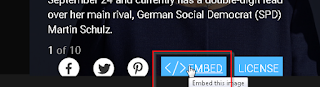
1.Find image you want to download from getty images.
2. At the image click on </embed> button
A new popup window,ll appear with image.
3. Right click on picture and select " Save page as"
save page as Html (name page as you want)
Go to your download folder. You can see there a html (getty-photo,html) page and a folder named getty-photo_files containing all of images you wan to download.
Enjoy !!!
Showing posts with label photo. Show all posts
Saturday, September 16, 2017
Sunday, March 9, 2014
Make dreamy photo in minutes with photoshop
In this tutorial we learn how to add dreamy look in a photo in quickly and without high skill.
Open an image in photoshop and duplicate (CTRL+J) the layer and name it 'Median'
Make sure layer name 'Median' is selected .. goto filters >> Noise >> Median
set the radius amount 10 px. ( or where u satisfied)
Apply (ok)
then change the median layer mode normal to 'hard light'
Also you can play with layer opacity .
See the difference .....
Open an image in photoshop and duplicate (CTRL+J) the layer and name it 'Median'
Make sure layer name 'Median' is selected .. goto filters >> Noise >> Median
set the radius amount 10 px. ( or where u satisfied)
Apply (ok)
then change the median layer mode normal to 'hard light'
Also you can play with layer opacity .
See the difference .....
Subscribe to:
Posts (Atom)
How to download High resolution Photo from Getty Images !! very easy
1.Find image you want to download from getty images. 2. At the image click on </embed> button A new popup window,ll appear with im...
-
In opencart when you want to install an extension or module some time opencart generate an error Invalid File Type! Solution extract...
-
An unexpected Shutdown of system or program may cause this error specially with portable apps. Go to portable app folder >> Da...
-
1.Find image you want to download from getty images. 2. At the image click on </embed> button A new popup window,ll appear with im...